Thursday, 6 August 2015

What is the main difference between servlet context and servlet config?

ServletConfig

1.ServletConfig available in javax.servlet.*; package
2.ServletConfig object is one per servlet class
3.destroyed once the servlet execution is completed.
4.We should give request explicitly, in order to create ServletConfig object for the first time
5.Object of ServletConfig will be created during initialization process of the servlet
6.This Config object is public to a particular servlet only

ServletContext

1.ServletContext available in javax.servlet.*; package
2.ServletContext object is global to entire web application
3.Object of ServletContext will be created at the time of web application deployment
4.Scope: As long as web application is executing, ServletContext object will be available, and 5.it will be destroyed once the application is removed from the server.
6.ServletContext object will be available even before giving the first request

Sunday, 19 April 2015

Remote Connection Settings for MySQL

Configuring your MySQL to access it from outside i.e. from any machine across intranet / internet is one of the basic needs of the developer.

The following sequence of steps are needed to achieve this.

We have to do the following changes,
  1. Change bind address in MySQL configuration file my.cnf to 0.0.0.0  This allows mysql to bind to all interfaces. Previous value may be  127.0.0.1
  2. In mysql DB we have added new user  root@%  and granted all permissions to it.
Command for reference,
  • select host,user,password from mysql.user
  • create user 'root'@'%' identified by 'pass';
  • GRANT ALL PRIVILEGES ON *.* TO 'root'@'%' WITH GRANT OPTION;
  • GRANT ALL PRIVILEGES ON *.* TO 'root'@'localhost' WITH GRANT OPTION;

We ideally will not require to do  anything in iptables (Linux Firewall)  but in some cases we would need to open 3306 port in the firewall settings. 

Saturday, 18 April 2015

Getting JVM heap size, used memory, total memory using Java Runtime

Getting JVM heap size, used memory, total memory using Java Runtime.

Reading runtime java virtual memory usage is useful when the system/application is struggling in getting resources. System Memory is one of the main resource that an application developer has to consider while managing the application.

Java’s Runtime class provide lot of information about the resource details of Java Virtual Machine or JVM. The memory consumed by the JVM can be read by different methods in Runtime class. Following is the  example of reading JVM Heap Size, Total Memory and used memory using Java Runtime api.

 public class MemoryUtilization {  
   public static void main(String [] args) {  
     int conversion = 1024*1024;       
     Runtime runtime = Runtime.getRuntime();       
     System.out.println("##### Heap utilization #####");       
     System.out.println("Used Memory:" + (runtime.totalMemory() - runtime.freeMemory()) / conversion);  
     System.out.println("Free Memory:" + runtime.freeMemory() / conversion);  
     System.out.println("Total Memory:" + runtime.totalMemory() / conversion);       
     System.out.println("Max Memory:" + runtime.maxMemory() /conversion);  
   }  
 }  

Thursday, 16 April 2015

How to create a read-only collection in java?

Collections is one of the most used feature in Java/J2EE applications . Read only List means a List where you can not perform modification operations like add, remove or set. You can only read from the List by using get method or by using Iterator of List, This kind of List is good for certain requirement where parameters are final and can not be changed. In Java you can use Collections.unModifiableList() method  to create read only List , Collections.unmodifiableSet() for creating read-only Set like read only HashSet and similarly creating a read only Map in Java.


 import java.util.ArrayList;  
 import java.util.Collections;  
 import java.util.List;  
 public class ReadOnlyCollections {  
           public static void main(String[] args) {  
                List<String> myList = new ArrayList<>();  
                myList.add("1");  
                myList.add("2");  
                myList.add("3");  
                System.out.println(myList);  
                // Convert to unmodifiable .  
                myList = Collections.unmodifiableList(myList);  
                myList.add("4");  
                System.out.println(myList);  
           }  
 }  
 Output -   
 [1, 2, 3]  
 Exception in thread "main" java.lang.UnsupportedOperationException  
      at java.util.Collections$UnmodifiableCollection.add(Unknown Source)  
      at ReadOnlyCollections.main(ReadOnlyCollections.java:15)  

Thursday, 26 February 2015

How to find disk space utilization using Java?

 import java.io.File;  
 import java.nio.file.FileSystem;  
 import java.nio.file.FileSystems;  
 import java.nio.file.Path;  
 import java.util.Iterator;  
 public class DiskSpace {  
  public static void main(String[] args) {  
            FileSystem fs = FileSystems.getDefault();  
            Iterable drives = fs.getRootDirectories();  
            Iterator path = drives.iterator();  
            while(path.hasNext()){  
                  Path p = path.next();    
                  String drive = p.toString();  
                  System.out.println(drive);  
                  File f = new File(drive);  
                  float freeSpace = f.getFreeSpace();  
                  float totalSpace = f.getTotalSpace();  
                  if(totalSpace > 0){  
                          float percentFree = (freeSpace/totalSpace)*100;  
                          System.out.println(drive + "---- " +freeSpace + "------ " + totalSpace + "---------- " + percentFree);  
                  }  
            }  
      }  
 }  

Tuesday, 24 February 2015

Difference between JSP include directive and JSP include action

@include 
<%@ include file=”filename” %> is the JSP include directive. At JSP page translation time, the content of the file given in the include directive is ‘pasted’ as it is, in the place where the JSP include directive is used. Then the source JSP page is converted into a java servlet class. The included file can be a static resource or a JSP page. Generally JSP include directive is used to include header banners and footers.


The JSP compilation procedure is that, the source JSP page gets compiled only if that page has changed. If there is a change in the included JSP file, the source JSP file will not be compiled and therefore the modification will not get reflected in the output. is the JSP include action element. 


<jsp:include>
The jsp:include action element is like a function call. At runtime, the included file will be ‘executed’ and the result content will be included with the soure JSP page.
 When the included JSP page is called, both the request and response objects are passed as parameters. If there is a need to pass additional parameters, then jsp:param element can be used. If the resource is static, its content is inserted into the calling JSP file, since there is no processing needed.

Wednesday, 11 February 2015

JAVA Access Modifiers

Java provides a number of access modifiers to set access levels for classes, variables, methods and constructors.
The four access levels are:
  1. private 
  2. default 
  3. protected 
  4. public 
There are many non-access modifiers such as static, abstract, synchronized, native, volatile, transient etc. Here, we will learn access modifiers.
1) private access modifier
The private access modifier is accessible only within class.

Example :- In this example, we have created two classes A and Simple. A class contains private data member and private method. We are accessing these private members from outside the class, so there is compile time error.


class A{  
private int data=40;  
private void msg(){System.out.println("Hello java");}  
}  
  
public class Simple{  
 public static void main(String args[]){  
   A obj=new A();  
   System.out.println(obj.data);//Compile Time Error  
   obj.msg();//Compile Time Error  
   }  
}  


Role of Private Constructor

If you make any class constructor private, you cannot create the instance of that class from outside the class. For example:

class A{  
private A(){}//private constructor  
void msg(){System.out.println("Hello java");}  
}  
public class Simple{  
 public static void main(String args[]){  
   A obj=new A();//Compile Time Error  
 }  
}  

Note: A class cannot be private or protected except nested class.


2) default access modifier
If you don't use any modifier, it is treated as default bydefault. The default modifier is accessible only within package.

Example of default access modifier
In this example, we have created two packages pack and mypack. We are accessing the A class from outside its package, since A class is not public, so it cannot be accessed from outside the package.

//save by A.java  
package pack;  
class A{  
  void msg(){System.out.println("Hello");}  
}  
//save by B.java  
package mypack;  
import pack.*;  
class B{  
  public static void main(String args[]){  
   A obj = new A();//Compile Time Error  
   obj.msg();//Compile Time Error  
  }  
}   
In the above example, the scope of class A and its method msg() is default so it cannot be accessed from outside the package.


3) protected access modifier

The protected access modifier is accessible within package and outside the package but through inheritance only.
The protected access modifier can be applied on the data member, method and constructor. It can't be applied on the class.

Example of protected access modifier

In this example, we have created the two packages pack and mypack. The A class of pack package is public, so can be accessed from outside the package. But msg method of this package is declared as protected, so it can be accessed from outside the class only through inheritance.
  1. //save by A.java  
  2. package pack;  
  3. public class A{  
  4. protected void msg(){System.out.println("Hello");}  
  5. }  
  1. //save by B.java  
  2. package mypack;  
  3. import pack.*;  
  4.   
  5. class B extends A{  
  6.   public static void main(String args[]){  
  7.    B obj = new B();  
  8.    obj.msg();  
  9.   }  
  10. }  
Output:Hello

4) public access modifier

The public access modifier is accessible everywhere. It has the widest scope among all other modifiers.

Example of public access modifier

  1. //save by A.java  
  2.   
  3. package pack;  
  4. public class A{  
  5. public void msg(){System.out.println("Hello");}  
  6. }  
  1. //save by B.java  
  2.   
  3. package mypack;  
  4. import pack.*;  
  5.   
  6. class B{  
  7.   public static void main(String args[]){  
  8.    A obj = new A();  
  9.    obj.msg();  
  10.   }  
  11. }  

Output:Hello

Summary :-

Modifier    | Class | Package | Subclass | World

public      |  Y    |    Y    |    Y     |   Y

protected   |  Y    |    Y    |    Y     |   N

no modifier |  Y    |    Y    |    N     |   N

private     |  Y    |    N    |    N     |   N

Checked & Unchecked Exception

1) Checked Exception is required to be handled by compile time while Unchecked Exception doesn't.
2) Checked Exception is direct sub-Class of Exception while Unchecked Exception are of Runtime Exception.
3) Checked Exception represent scenario with higher failure rate while Unchecked Exception are mostly programming mistakes.

Here are few examples of Unchecked Exception in Java library:

  • NullPointerException
  • ArrayIndexOutOfBound
  • IllegalArgumentException
  • IllegalStateException


Summary:
1. Both Checked and Unchecked Exception are handled using keyword try, catch and finally.
2. In terms of Functionality Checked and Unchecked Exception are same.
3. Checked Exception handling verified during compile time.
4. Unchecked Exception are mostly programming errors
5. JDK7 provides improved Exception handling code with catching multiple Exception in one catch block and reduce amount of boiler plate code required for exception handling in Java.

Monday, 17 November 2014

What is static and dynamic class loading in Java?

Static Class Loading: Creating objects and instance using new keyword is known as static class loading. The retrieval of class definition and instantiation of the object is done at compile time.

Using new operator you load classes statically in java.

public static void main(String[] args)
{
 Sample m = new Sample();
}

Dynamic Class Loading: Dynamic class loading is done when the name of the class is not known at compile time. Dynamic class loading also called as reflection.This can be achieved by invoking the Class loader functions programmatically. Typically we use Class.forName(String className) to get the class first and then we will call the newInstance() method on the returned class to get the instance.

For example if you want to get a instance of Sample class using dynamic class loading, you have to ...
Sample sample = null;
Class sampleClass = Class.forName("com.sample.Sample");
sample = (Sample) sampleClass.newInstance();
sample.doSomeThing();
Here in dynamic class loading ClassNotFoundException can be thrown if given Class loader doesn’t find the given Class name (com.sample.Sample) in the classpath. Class Loader looks for a given class in following sequence:

  • The forName(..) method in the class called Class
  • The findSystemClass(..) method in the class class called ClassLoader
  • The loadClass(..) method in the class called ClassLoader

Tuesday, 28 October 2014

Java Class Loaders

        Class loaders are hierarchical. Classes are introduced into the JVM as they are referenced by name in a class that is already running in the JVM. So how is the very first class loaded? The very first class is specially loaded with the help of static main() method declared in your class. All the subsequently loaded classes are loaded by the classes, which are already loaded and running. A class loader creates a namespace. All JVMs include at least one class loader that is embedded within the JVM called the primordial (or bootstrap) class loader. Now let’s look at non-primordial class loaders. The JVM has hooks in it to allow user defined class loaders to be used in place of primordial class loader. Let us look at the class loaders created by the JVM.


Classloaders and their explaination -  
  • Bootstrap (primordial) - No Loads JDK internal classes, java.* packages. (as defined in the  sun.boot.class.path system property, typically loads rt.jar and i18n.jar). Classes loaded by Bootstrap  class loader have no visibility into classes loaded by its descendants (i.e. Extensions and Systems  class loaders).

  • Extensions - Loads jar files from JDK extensions directory (as defined in the java.ext.dirs system property – usually lib/ext directory of the JRE)
  • System - No Loads classes from system classpath (as defined by the java.class.path property, which is set by the CLASSPATH environment variable or –classpath or –cp command line options). The classes loaded by system class loader have visibility into classes loaded by its parents (ie Extensions and Bootstrap class loaders).


Monday, 27 October 2014

Tomcat HTTP to HTTPS redirect

The following post shows how to easily redirect HTTP to HTTPS in Tomcat servlet container that it always requires secure connection. It was assumed that the following TCP ports are used for that purpose:

8080: for HTTP
8443: for HTTPS


  • Edit you server.xml file located in conf folder of tomcat installation directory

<Connector port="8080" protocol="HTTP/1.1"
     redirectPort="443"/>

<Connector port="8443" protocol="HTTP/1.1"
    SSLEnabled="true"
    scheme="https" secure="true"
    clientAuth="false"
    sslProtocol="TLS"
    keystoreFile="conf/keystore"
    keystorePass="s00perSeeekrit"/>

  • Add below entry in web.xml of your tomcat conf folder.
<security-constraint>
     <web-resource-collection/>
         <web-resource-name>HTTPSOnly</web-resource-name>
         <url-pattern>/*</url-pattern
     </web-resource-collection>
     <user-data-constraint>
         <transport-guarantee>CONFIDENTIAL</transport-guarantee>
     </user-data-constraint>
</security-constraint>
  • Restart Tomcat.
You're done! The Tomcat always requires secure connection now...

Friday, 24 October 2014

Singleton Design Pattern in java

This pattern involves a single class which is responsible to creates own object while making sure that only single object get created. This class provides a way to access its only object which can be accessed directly without need to instantiate the object of the class.

The Singleton's purpose is to control object creation, limiting the number of obejcts to one only. Since there is only one Singleton instance, any instance fields of a Singleton will occur only once per class, just like static fields. Singletons often control access to resources such as database connections or sockets.


There are many classes in JDK which is implemented using Singleton pattern like java.lang.Runtime which provides getRuntime() method to get access of it and used to get free memory and total memory in Java.

Implementing Singletons:


The easiest implementation consists of a private constructor and a field to hold its result, and a static accessor method with a name like getInstance().

The private field can be assigned from within a static initializer block or, more simply, using an initializer. The getInstance( ) method (which must be public) then simply returns this instance:
// File Name: Singleton.java
public class Singleton {

   private static Singleton singleton = new Singleton( );
   
   /* A private Constructor prevents any other 
    * class from instantiating.
    */
   private Singleton(){ }
   
   /* Static 'instance' method */
   public static Singleton getInstance( ) {
      return singleton;
   }
   /* Other methods protected by singleton-ness */
   protected static void demoMethod( ) {
      System.out.println("demoMethod for singleton"); 
   }
}
Here is the main program file where we will create singleton object:
// File Name: SingletonDemo.javapublic class SingletonDemo {
   public static void main(String[] args) {
      Singletontmp = Singleton.getInstance( );
      tmp.demoMethod( );
   }
}
This would produce the following result:
demoMethod for singleton


Interview Questions & Answers on singleton class:


Question: What is double checked locking in Singleton?
Answer: Double checked locking is a technique to prevent creating another instance of Singleton when call to getInstance() method is made in multi-threading environment. In Double checked locking pattern as shown in below example, singleton instance is checked two times before initialization.

public static Singleton getInstance(){
     
if(_INSTANCE == null){
         
synchronized(Singleton.class){
         
//double checked locking - because second check of Singleton instance with lock
                
if(_INSTANCE == null){
                    _INSTANCE = 
new Singleton();
                
}
            
}
         
}
     
return _INSTANCE;
}

Double checked locking should only be used when you have requirement for lazy initialization otherwise use Enum to implement singleton or simple static final variable.


Question: How do you prevent for creating another instance of Singleton using clone() method?
Answer: Preferred way is not to implement Clonnable interface as why should one wants to create clone() of Singleton and if you do just throw Exception from clone() method as “Can not create clone of Singleton class”.


Question: What is lazy and early loading of Singleton and how will you implement it?
Answer: As there are many ways to implement Singleton like using double checked locking or Singleton class with static final instance initialized during class loading. Former is called lazy loading because Singleton instance is created only when client calls getInstance() method while later is called early loading because Singleton instance is created when class is loaded into memory.


If you have 

Wednesday, 22 October 2014

hashCode() and equals() methods in java

Usage of hashCode() and equals()
hashCode() method is used to get a unique integer for given object. This integer is used for determining the bucket location, when this object needs to be stored in some HashTable like data structure. By default, Object’s hashCode() method returns and integer representation of memory address where object is stored.

equals() method, as name suggest, is used to simply verify the equality of two objects. Default implementation simply check the object references of two objects to verify their equality.


Overriding the default behavior
Everything works fine until you do not override any of these methods in your classes. But, sometimes application needs to change the default behavior of some objects.

Lets take an example where your application has Employee object. Lets create a minimal possible structure of Employee class

public class Employee
{
    private Integer id;
    private String firstname;
    private String lastName;
    private String department;

    public Integer getId() {
        return id;
    }
    public void setId(Integer id) {
        this.id = id;
    }
    public String getFirstname() {
        return firstname;
    }
    public void setFirstname(String firstname) {
        this.firstname = firstname;
    }
    public String getLastName() {
        return lastName;
    }
    public void setLastName(String lastName) {
        this.lastName = lastName;
    }
    public String getDepartment() {
        return department;
    }
    public void setDepartment(String department) {
        this.department = department;
    }
}
Above Employee class has some very basic attributes and there accessor methods. Now consider a simple situation where you need to compare two employee objects.
public class EqualsTest {
    public static void main(String[] args) {
        Employee e1 = new Employee();
        Employee e2 = new Employee();

        e1.setId(100);
        e2.setId(100);
        //Prints false in console
        System.out.println(e1.equals(e2));
    }
}
Above method will print “false“. But, is it really correct after knowing that both objects represent same employee. In a real time application, this must return true.

To achieve correct behavior, we need to override equals method as below:
public boolean equals(Object o) {
        if(o == null)
        {
            return false;
        }
        if (o == this)
        {
           return true;
        }
        if (getClass() != o.getClass())
        {
            return false;
        }
        Employee e = (Employee) o;
        return (this.getId() == e.getId());
}
Add this method to your Employee class, and EqualsTest will start returning “true“.

So are we done? Not yet. Lets test again above modified Employee class in different way.
import java.util.HashSet;
import java.util.Set;

public class EqualsTest
{
    public static void main(String[] args)
    {
        Employee e1 = new Employee();
        Employee e2 = new Employee();

        e1.setId(100);
        e2.setId(100);

        //Prints 'true'
        System.out.println(e1.equals(e2));

        Set employees = new HashSet();
        employees.add(e1);
        employees.add(e2);
        //Prints two objects
        System.out.println(employees);
    }
}
Above class prints two objects in second print statement. If both employee objects have been equal, in a Set which stores only unique objects, there must be only one instance inside HashSet, after all both objects refer to same employee. What is it we are missing??

We are missing the second important method hashCode(). As java docs say, if you override equals() method then you must override hashCode() method. So lets add another method in our Employee class.
@Override
 public int hashCode()
 {
    final int PRIME = 31;
    int result = 1;
    result = PRIME * result + getId();
    return result;
 }
Once above method is added in Employee class, the second statement start printing only single object in second statement, and thus validating the true equality of e1 and e2.

Key Points
  • Always use same attributes of an object to generate hashCode() and equals() both. As in our case, we have used employee id.
  • equals() must be consistent (if the objects are not modified, then it must keep returning the same value).
  • Whenever a.equals(b), then a.hashCode() must be same as b.hashCode().
  • If you override one, then you should override the other.
If you feel, I am missing something or wrong somewhere, please leave a comment. I will update this post again to help others.

Hashmap in Java

If anybody asks me to describe “How HashMap works?“, I simply answer: “On principle of Hashing“. HashMap is a Collection which works on principle of Hashing and it uses key and value pairs to store the information and we can get the value if we pass key to the HashMap. You can also say HashMap is fast as it is not synchronized.

HashMap class comes from java.util package and HashMap class extends AbstractMap and implements Map, Cloneable and Serializable interfaces. HashMap is nothing but Hash table based implementation of Map Interface.


What is Hashing

Hashing in its simplest form, is a way to assigning a unique code for any variable/object after applying any formula/algorithm on its properties. A true Hashing function must follow this rule:

Hash function should return the same hash code each and every time, when function is applied on same or equal objects. In other words, two equal objects must produce same hash code consistently.

Note: All objects in java inherit a default implementation of hashCode() function defined in Object class. This function produce hash code by typically converting the internal address of the object into an integer, thus producing different hash codes for all different objects.

A little about Entry class

A map by definition is : “An object that maps keys to values”. Very easy.. right?
So, there must be some mechanism in HashMap to store this key value pair. Answer is YES. HashMap has an inner class Entry, which looks like this:

static class Entry implements Map.Entry{
          final K key;
          V value;
          Entry next;
          final int hash;
          ...
}

Surely Entry class has key and value mapping stored as attributes. Key has been marked as final and two more fields are there: next and hash.


put() method in hashmap

We need to pass Key and Value object to put() method in Java HashMap. Once we pass the key and value to in put() method of HashMap, HashMap calls hashCode method on key object and use hashcode into own hashing function to find the bucket location. Bucket is the place where Entry object is stored and hashcode is like an address of that bucket. So what exactly we store in bucket? This is very important to understand. Java stores both Key and Value object as a Map.Entry in bucket. These are stored like LinkedList. But why these are stored as LinkedList. As we know we are using the hashcode to find the bucket location but two unequal objects can have same hashcode. So there are chances of collision. So along with value key is stored.


get() methods in hashmap

We need to pass key to the get method which takes the key as an argument and try to find bucket position using the hashcode. Once it finds the bucket using equals function it gets the value and returns it.

If no match is found, get() method returns null.


Key Notes


  • Data structure to store Entry objects is an array named table of type Entry.
  • A particular index location in array is referred as bucket, because it can hold the first element of a LinkedList of Entry objects.
  • Key object’s hashCode() is required to calculate the index location of Entry object.
  • Key object’s equals() method is used to maintain uniqueness of Keys in map.
  • Value object’s hashCode() and equals() method are not used in HashMap’s get() and put() methods.
  • Hash code for null keys is always zero, and such Entry object is always stored in zero index in Entry[].
  • Order in not maintained in hashmap.


What is the load factor in java HashMap and what happens when size of the HashMap exceeds a given threshold defined by load factor?

Load factor of HashMap is is .75 it will act to re-size the map once it filled 75%, so once size exceeds 75%, then Java HashMap re-size itself by creating a new bucket array of size twice of size defined previously for the HashMap ,then it start putting every old element into that new bucket array. This process is also called rehashing because hash function is used to find the new bucket location.

What are the differences between HashMap and Hashtable?

Lets see what are the differences we can see in HashMap and Hashtable.

1. Synchronization :
Hashtables are synchronized , it means at one point of time only one thread can modify a Hashtable. i.e any thread before performing an update on a hashtable will be acquiring a lock on the object while others will wait for lock to be released.
Hashmap is not synchronized , but we can make it synchronized.

2. Fail-safe:
Iterator of HashMap is fail-safe but the enumerator for the Hashtable is not fail-safe. Lets see what exactly fail-safe is. If an iterator has been created on a collection object and some other thread tries to modify this object , a concurrent modification exception will be thrown. So fail safe is like ability of system to fail but it wont produce some catastrophic results.

3. null values
Hashtable doesn’t allow null but Hashmap allows null values.

Hibernate Entity / Persistence LifeCycle States

As you know that Hibernate works with normal Java objects that your application creates with the new operator. In raw form (without annotations), hibernate will not be able to identify your java classes, but when they are properly annotated with required annotations then hibernate will be able to identify them and then work with them e.g. store in DB, update them etc. These objects can be said to mapped with hibernate.

Given an instance of an object that is mapped to Hibernate, it can be in any one of four different states: transient, persistent, detached or removed.

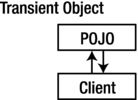
Transient Object

Transient objects exist in heap memory. Hibernate does not manage transient objects or persist changes to transient objects.
Transient objects are independent of Hibernate
To persist the changes to a transient object, you would have to ask the session to save the transient object to the database, at which point Hibernate assigns the object an identifier and marks the object as being in persistent state.

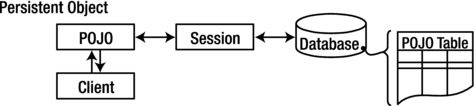
Persistent Object

Persistent objects exist in the database, and Hibernate manages the persistence for persistent objects.
Persistent objects are maintained by Hibernate
If fields or properties change on a persistent object, Hibernate will keep the database representation up to date when the application marks the changes as to be committed.

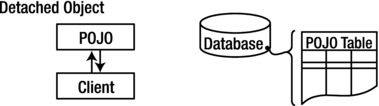
Detached Object

Detached objects have a representation in the database, but changes to the object will not be reflected in the database, and vice-versa. This temporary separation of the object and the database is shown in image below.
Detached objects exist in the database but are not maintained by Hibernate
A detached object can be created by closing the session that it was associated with, or by evicting it from the session with a call to the session’s evict() method.
In order to persist changes made to a detached object, the application must reattach it to a valid Hibernate session. A detached instance can be associated with a new Hibernate session when your application calls one of the load, refresh, merge, update(), or save() methods on the new session with a reference to the detached object. After the call, the detached object would be a persistent object managed by the new Hibernate session.

Removed Object

Removed objects are objects that are being managed by Hibernate (persistent objects, in other words) that have been passed to the session’s remove() method. When the application marks the changes held in the session as to be committed, the entries in the database that correspond to removed objects are deleted.

Key Points

  1. Newly created POJO object will be in the transient state. Transient object doesn’t represent any row of the database i.e. not associated with any session object. It’s plain simple java object.
  2. Persistent object represent one row of the database and always associated with some unique hibernate session. Changes to persistent objects are tracked by hibernate and are saved into database when commit call happen.
  3. Detached objects are those who were once persistent in past, and now they are no longer persistent. To persist changes done in detached objects, you must reattach them to hibernate session.
  4. Removed objects are persistent objects that have been passed to the session’s remove() method and soon will be deleted as soon as changes held in the session will be committed to database.